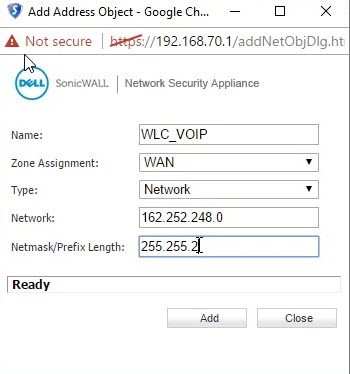
- Create a new Address Object:
- 162.252.248.0/22 - the subnet mask of /22 is 255.255.252.0
- Name the Address Object (in this example, "WLC_VOIP")
- Create a new Service Object:
- Enable ports 5060 - 65535 of UDP traffic
- Name the Service Object (in this example, "VOIP_PORTS")
-1.jpeg?width=391&height=417&name=auth_image%20(1)-1.jpeg)
- Create 2 Firewall Access Rules:
- From LAN to WAN
- Source - Any
- Destination - WLC_VOIP
- Service - VOIP_PORTS
- Allow
- Advanced Tab - Set UDP Timeout to 3600 seconds
.jpeg?width=624&height=691&name=auth_image%20(2).jpeg)
-
From WAN to LAN
-
Source - WLC_VOIP
-
Destination - Any
-
Service - VOIP_PORTS
-
Allow
-
Advanced Tab - Set UDP Timeout to 3600 seconds
.jpeg?width=475&height=539&name=auth_image%20(3).jpeg)
.jpeg?width=614&height=687&name=auth_image%20(4).jpeg)
-
English